By Cheenu Madan
13 May 2014
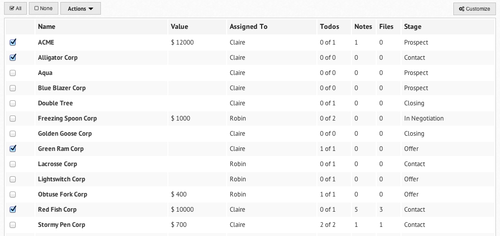
We just redesigned the List View. You’ll notice the following enhancements
- Much more compact, can view more leads per screen
- Add todos, notes and files directly from the list view
- Customize button on the top right corner of the table. Using this option, you can select which columns you want to display and which columns you would like to hide
- Actions button near the top left corner of the table. Using this option, you can carry out the following actions - assignment, unassignment, merge leads, delete leads and change stage of multiple leads at once.
We’ll be enhancing the list view with even more functionality soon. If you have any suggestions, do let us know in the comments!
blog comments powered by