28 April 2014
We’ve added the following improvements to the Pipeline View
An advanced lead creator
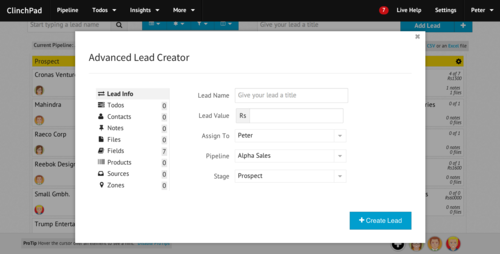
The current workflow for creating a lead involved typing in the lead name in the ‘Add Lead’ box on the top right corner of the Pipeline View. A new lead card would then be created which you could click on to add additional information such as contacts, notes, todos etc.
However, in case one was to enter multiple leads in succession, this workflow would get too tedious. To fix that, you can now create a lead along with additional information such as contacts, notes, todos etc without having to leave the Pipeline View. Clicking on the ’+’ icon next to 'Add Lead’ will open up a popup window.
Ability to add notes, todos and files to an existing lead
Notes, todos and files are the most common information that is added to existing leads. Instead of clicking on the lead card and navigating to their respective tabs, you can now view, edit and delete notes, todos and files right from the Pipeline View itself by just clicking on the 'x notes’, 'x of y todos’ or 'x files’ text on the lead cards. This will open up a popup window.