16 January 2014
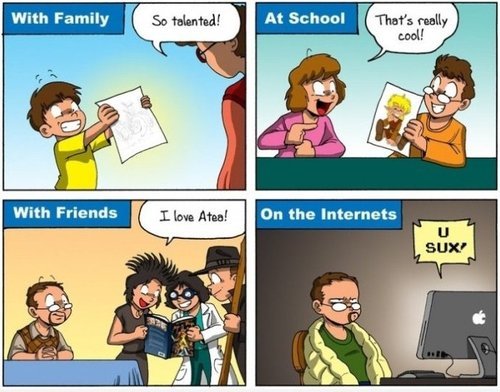
Image Source: So … You’re a Cartoonist?
Whenever you sign up for an website, you generally receive an automated welcome email. For ClinchPad, I wanted this email should look professional, similar to the ones you would receive from a well established company. So I created a sleek looking email that matched the color scheme of our app. I spent hours making it pixel perfect. I spent money on a service that sent you screenshots of how your email would look on different email clients and mobile phones and optimized the email so that it looked great across all platforms. I spent time perfecting the copy of the email and signed off the email as ‘Team ClinchPad’.
In the email, I requested users for feedback on what they thought about our application since feedback for a startup in the early stages is crucial. Out of the hundreds of signups that we got, how many people responded to this professionally crafted email that I spent almost a week on?
Not a single one of the signups bothered to reply.
Then, I replaced it with a simple email with HTML links. No CSS, no colors, no tables, nothing. It was sent from my personal email address and signed off with my name and title.
And now more than 10% of our signups reply to this email. Thats over 100s of email replies letting us know what they loved , what they didn’t like, their problems, suggestions and questions. Time it took me to write this email? 45 minutes.
I made the classic mistake of assuming more work = results. I figured if I sweated every pixel and every word of the email, it would be better. The users would see from our email how much we cared. They didn’t. The users didn’t care for a jazzy email telling them how important their feedback was to ClinchPad, they cared for a personal email from the founder requesting for feedback.
Here is what our welcome email now looks like
Hello <name>,
I am Cheenu Madan, the guy behind ClinchPad. I hope you’re enjoying using ClinchPad, but more importantly, you see how ClinchPad can help you grow your business. Remember, your account is FREE for the first 100 leads that you track so go nuts!
ClinchPad was created with the goal to be the most intuitive online application for tracking your leads. It is loved by small & medium sized business all over the world for its simplicity. I hope your business will also soon be in the list of happy users.
Please feel free to hit the reply button and email me your questions, suggestions or to fix up a time when we can chat or Skype about anything under the sun :). We are always improving the application based on the feedback we get from our users.
—-
Cheenu Madan
Founder, ClinchPad
https://www.clinchpad.com
This is a pretty straightforward email. I introduce myself in the first paragraph which lends a personal touch. I remind the reader of what ClinchPad is in the second paragraph. The third paragraph has a clear call to action (reply!). There is no fourth paragraph because emails shouldn’t have more than three paragraphs.
Besides crafting a simple, personal welcome e-mail - here are a couple of more tips to maximize the response rates from the emails you send out to your users
It is pretty much standard practice to send out the welcome email as soon as the user signs up. Most likely because it is the easiest to do from a technical point of view - as soon as the user signs up, create and queue up an email that’ll be sent to a background mailer.
However you should delay the sending out of the welcome email to a couple of hours at least. This gives the user time to check out your product. Then a couple of hours later, when they’ve checked out your product and formed an opinion, they get the email and the user replies instantly with their feedback since they have had time to form an impression about the product.
We queue up all the welcome emails and send them out at a specified time of the day (late evening). This, at least in theory, means that we catch the user when they’re not very busy (at home) or they address it in the next morning which is usually time dedicated for catching up on emails.
In addition to the welcome email, there are two other lifecycle emails you should be sending out if you have a SaaS product.
The first one is the email when the user becomes an active user. Set a criteria for classifying an user as active and when the user matches that criteria, send the user an email stating your appreciation and your willingness to help the user onboard.
This is how the email we send out to our active users looks like
Hello <name>,
I am Cheenu Madan, the guy behind ClinchPad. I noticed that you have been quite active on ClinchPad which is awesome! We hope to have you as an happy and active user for a long time.
Please feel free to hit the reply button and get in touch. I would love to know your experience on ClinchPad so far, particularly what we can do to further improve your experience. We can also set up a Skype call to discuss how you can grow your business using ClinchPad, just let me know by replying to this email.
You might also be interested in checking out ClinchPad’s blog which is regularly updated with quality content in addition to announcing feature releases.
—-
Cheenu Madan
Founder, ClinchPad
https://www.clinchpad.com
The second email that you should be sending out is when the user becomes inactive. This is usually when the user hasn’t logged in for a set period of time and is primarily designed to solicit feedback rather than getting the user back to using the product.
This is how the email we send out to inactive users looks like
Hello <name>,
I am Cheenu Madan, the guy behind ClinchPad which is an online Sales CRM & Lead Management application. I noticed that you have been inactive on ClinchPad for awhile now.
I was wondering if I could get some quick feedback on why ClinchPad isn’t working out for you. What things did you dislike about ClinchPad?
I know you might be busy but your candid response would really help. Your feedback is the only way I can improve ClinchPad.
—-
Cheenu Madan
Founder, ClinchPad
https://www.clinchpad.com
Although we got a few users to start using the app again after being ‘reminded’ by this email, but the feedback we’ve received to this email is much more valuable to us. Negative feedback can be harsh for some people to stomach, but we love finding out what features are missing from our product, which parts we could improve, what users think about the pricing and other stuff.
To avoid getting in trouble with the spam filters (and making humans mad), include a simple, one click unsubscribe link in your emails. For those who don’t want to engage, give them an easy way to opt out of receiving any more email from your domain instead of having them to mark the emails as spam and getting your domain in hot water with the spam filters.
Happy emailing!