20 November 2013
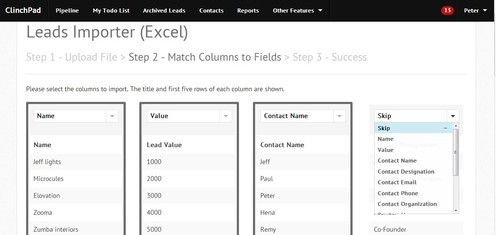
A lot of our users have requested us to build a feature to import leads directly from Excel and CSV files. Now, you can seamlessly import leads directly from Excel and CSV files into your ClinchPad account. You can import leads along with the lead values, contacts, products, zones, sources and notes associated with the leads in one go!
The import lead option can be directly accessed from the main pipeline page or from import option inside the settings page.
Once you select the Import option, a wizard will help you import your leads into the account
Running your own business? The ClinchPad Blog is a blog about growing your business and productivity.
5 Great Strategies to Build Customer Engagement
6 Pratical Solutions to Sales Bottlenecks
5 Simple Tips to Improve Your Sales Forecasts
6 Effective Tips for Successful Cold Calling
10 Quick Tips to Write a Killer Business Proposal
5 Effective Ways to Stay Profitable through Multi Channel Sales
The Buying Decision Process and Few Amazing Ways to Streamline It
4 Simple Ways to Convince Price Sensitive Customers
6 Easy Steps for a Stress Free Life
5 Simple Ideas to Speed Up Your Sales Cycle
4 Simple Steps to Build Perfect Customer Profiles
How to Improve Your Active Listening Skills and Enhance Customer Engagement.
Tips on Selling by Robert Oswald, Braintree Payments
How We Got Users To Give Feedback Via Email
How We Got Users To Give Feedback Via Email
The Cold Emails That Worked For Us
The 30 day free trial is (mostly) broken
Subscription Payment Solutions for SaaS Startups based out of India
Import your leads directly from Excel and CSV files
Now, view reports in tabular format
Organization wide view of tasks