6 June 2013
We’re introduced a new feature that makes it easy to track what your team is doing.
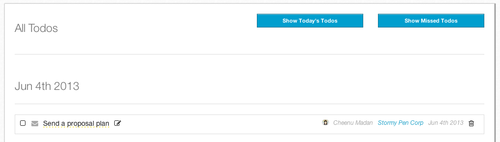
You can access this feature by going to Other Features -> All Todos. This option will be visible only to those who have an Admin role.
This lists all the todos in the account and is helpful for seeing what upcoming tasks your team has. There are two tabs on the upper right corner - Show Today’s Todos which shows all the todos with todays date and Show Missed Todos which shows all the todos that have been missed.
With these three views of todos across the account, you can now easily track tasks that your team is supposed to be doing.
Running your own business? The ClinchPad Blog is a blog about growing your business and productivity.
5 Great Strategies to Build Customer Engagement
6 Pratical Solutions to Sales Bottlenecks
5 Simple Tips to Improve Your Sales Forecasts
6 Effective Tips for Successful Cold Calling
10 Quick Tips to Write a Killer Business Proposal
5 Effective Ways to Stay Profitable through Multi Channel Sales
The Buying Decision Process and Few Amazing Ways to Streamline It
4 Simple Ways to Convince Price Sensitive Customers
6 Easy Steps for a Stress Free Life
5 Simple Ideas to Speed Up Your Sales Cycle
4 Simple Steps to Build Perfect Customer Profiles
How to Improve Your Active Listening Skills and Enhance Customer Engagement.
Tips on Selling by Robert Oswald, Braintree Payments
How We Got Users To Give Feedback Via Email
How We Got Users To Give Feedback Via Email
The Cold Emails That Worked For Us
The 30 day free trial is (mostly) broken
Subscription Payment Solutions for SaaS Startups based out of India
Import your leads directly from Excel and CSV files
Now, view reports in tabular format
Organization wide view of tasks