
The ClinchPad Blog
Month
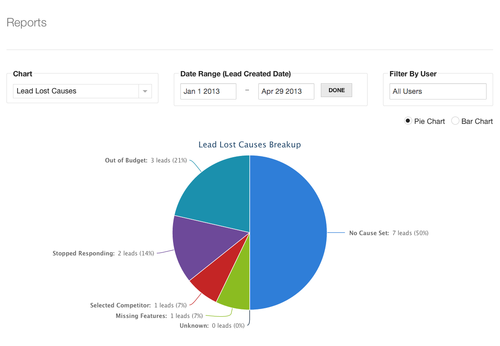
We’ve added two new charts to the reports feature - Lead Won Causes and Lead Lost Causes which display the breakup of cause of the lead being won and lost respectively.
We use 10+ different SaaS applications at ClinchPad. Since our product is also a SaaS application, I’ve been paying great attention to the factors that cause me to pick one SaaS product over another. It turns out one of the most important things is the pricing plans.
Generally, you offer something to a prospect for free so that they get hooked on to it and start using it. This concept of offering a teaser is prevalent occurs all industries (ice cream parlors allowing you a taste for example) and in the SaaS vertical manifests itself most commonly either as a limited time trial or a freemium. So most SaaS applications pick one of the two.
However, more SaaS applications should also consider a usage limited trial. This basically means picking a really low usage limit, such as Dropbox putting a disk space limit of 100MB. It wouldn’t really work for Dropbox for obvious reasons but depending on what your SaaS application does, it might just work for you.
For example, our product ClinchPad is a sales CRM. Most other CRMs either have a limited time trial or a freemium plan with up to X seats being free. ClinchPad on the other hand is free up to 100 leads. This allows the following advantages
An example of where having a usage based trial worked is when I was choosing an analytics provider for ClinchPad. KISSmetrics was my first choice, I had already read several helpful articles on their blog and the reviews around the Internet where good.
However, they have really short 14 day trial period and their minimum pricing plan is $149/month. That is a little too much when you’re a bootstrapped startup doing a private alpha with 10 users. Mixpanel on the other hand is free up to 25,000 events which was quickly exhausted once we started gaining traction but allowed use it for four months for free while we were developing it (vs. paying KISSmetrics $600 which was more than all our other expenses combined).
Discuss this post on Hacker News
I’m Cheenu Madan, the guy behind ClinchPad. I’m getting started on Twitter, follow me at @cheenumadan
In case you’ve been following the blog, you’ll know that we just came out of beta. We’ve released several new features and launched our paid and free plans. Since our launch, we have been getting a lot of questions on how ClinchPad differentiates itself from the other CRMs out there in a very crowded space and why one should use ClinchPad over other CRMs or even use a sales CRM in the first place.
ClinchPad was built to serve a very specific niche, the Fortune 500000 businesses. This focus can be seen in the web application (sign up and check it out in less time it takes to read this blog post). Your time is valuable and ClinchPad has been designed to get you started as quickly as possible with the goal of having almost no learning curve.
ClinchPad isn’t focused only on tracking data and generating reports but also optimized for user happiness. It integrates nicely with Google applications such as Google Calendar, Contacts and Gmail. It focuses on collaboration, by making everything shared by default you don’t ever have your boss asking on the status of a lead or a colleague asking the contact information for a potential customer.
ClinchPad’s scope extends to only one business aspect - the sales pipeline. This is unlike many other CRMs which double up as helpdesks, project collaboration applications, social media managers and have various other features. These applications usually need a lot of time to be set up (hiding unneeded features, putting key features on the home screen etc) resulting in a lower setup time & learning curve.
ClinchPad’s pricing has been designed to be SME friendly. You can use ClinchPad free forever as long as you have less than 100 leads and use less than 250MB of space. If you ever exceed this, then you’re automatically switched over to a 14 day trial of the appropriate paid plan. All the paid plans are extremely affordable and include all the features. You can check out the free and paid plans on the pricing page.
Hopefully, the above description has excited you enough to check it out. You can see the full list of features here. We would love your thoughts at [email protected] especially on how the user experience can be improved and what features you’d like to see added.
We’re pleased to announce a new feature - Causes. Now you can attribute a cause when marking your lead as won or lost e.g. ‘Out of Customer Budget’ for a lost lead.
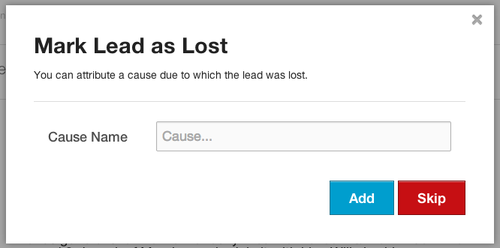
You’ll now see a modal dialog show up whenever you click on ‘Mark As Won’ or ‘Mark As Lost’ where you can type in the cause name.
You can view, create, edit and delete the existing causes by clicking on Other Features in the top menu bar and selecting Causes.
We’re pleased to announce two new features.
Account Maildrop
Currently, each lead in ClinchPad has a Maildrop which is an email address where all email forwarded to it will be attached to the lead. Account Maildrop is also an email address but it isn’t associated with a particular lead. Instead, email sent to it is checked for matching ClinchPad contacts among the sender and receivers and attached to the leads associated with the contact.
You can CC/BCC the Account Maildrop email address and thus have it attached to the appropriate lead without having to look up the lead’s Maildrop address.
Forward Mail with Attachments
Any email with an attachment or attachments that is attached to a lead via Lead Maildrop, Account Maildrop or Gmail Integration will have all its attachments uploaded and added to the files of the lead. So you can have important documents sent to and received from prospects automatically added to leads by CC/BCCing the Maildrop address or by Gmail integration. No need to manually upload files!
We’re pleased to announce a new feature. Now you can save on manual entry of contacts and organizations by importing them from a CSV or Excel (.xls/xlsx) file.
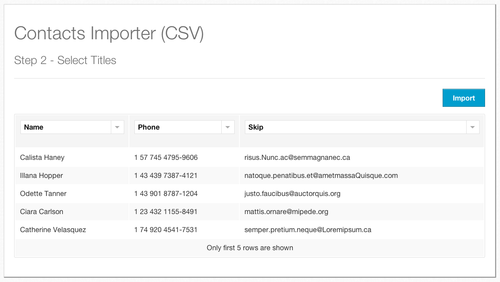
You can get started by clicking on the ‘Import Contacts’ or ‘Important Organizations’ button in the ‘Contacts’ page.
We’re pleased to announce integration with several Google Apps.
Gmail
You can integrate ClinchPad with your Gmail mailbox. Once integrated, ClinchPad will automatically scan sent and received emails to see if the senders and recipient match a contact and add the matched emails to the leads associated with the contact.
To get started with integrating your Gmail mailbox with ClinchPad, click the ‘Gmail Integration’ menu item in the ‘Settings’ page.
Google Contacts
You can integrate your Google Contacts account with ClinchPad. Once integrated, you can sync the accounts which will add all contacts present in your Google Contacts account to ClinchPad and vice versa. If there are two contacts of the same name, then ClinchPad will try and merge the contacts. ClinchPad can also track updates to contacts such that if an added contact on Google Contact or ClinchPad is subsequently updated, then a sync updates it on the other source too.
To get started with integrating your Google Contacts account with ClinchPad, click the ‘Sync Google Contacts’ button in the Contacts page.
It is strongly recommended that you create a new contact group to sync your contacts.
Google Calendar
You can integrate your Google Calendar account with ClinchPad. Once integrated, any todo created, updated or deleted in a lead assigned to you will cause a calendar event to be created, updated or deleted respectively.
To get started with integrating your Google Calendar account with ClinchPad, click the ‘Sync with Google Calendar’ button in the ‘My Todo List’ page.
ClinchPad is no longer in beta. We have released several features recently and thus the application has reached a stage where we feel confident in removing the beta tag. We would like to thank our early adopters for their awesome feedback during beta, you guys are awesome!
Our pricing & plans are listed here https://clinchpad.com/pricing. You can view your current plan, usage and switch to a paid plan in the ‘Settings’ page by selecting the ‘Billing’ menu item.
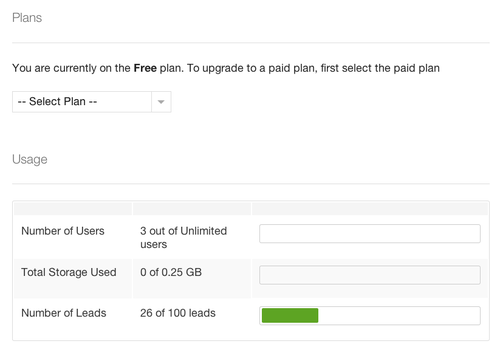
Remember, there is always a free plan. As long as the total number of leads are less than 100 leads and the total storage used is less than 250MB, you don’t have to worry about a paid plan. This is ideal for startups and businesses that are just getting started.
For all those whose current usage exceeds the free plan limits, don’t worry. You account won’t be blocked off. Instead, you’ll get an email notification and it’ll remain active for 14 days after the usage limits are exceeded, giving you sufficient time to enter your payment information.